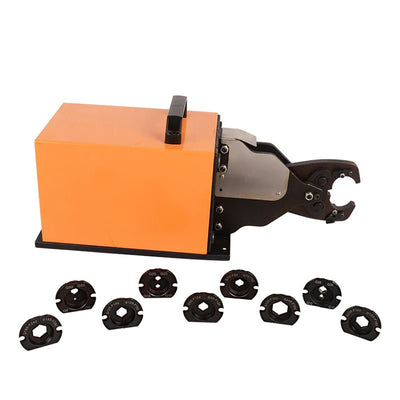
Move repeat lug assembly to a fixed workbench
For battery-cable and equipment wiring workshops with a suitable air supply.
Choose the right configuration
The listed 6–70 mm² range depends on the selected profile and die. Choose B, point, hex or AWG configuration from the terminal requirement, not appearance.
Prepare cable before batch crimping
Use a cutter and radial stripper sized for the actual cable. The general 0.2–6 mm² IWE-5 stripper cannot prepare this machine's full range.
Get a model and application check before ordering
AM-70 — application and selection
An air-powered cable-lug crimper for repeated workbench assembly, with distinct tool profiles and die-only options. Select both the machine configuration and terminal system.
Pneumatic drive reduces repeated manual squeezing at a fixed assembly station. It does not automatically feed terminals, select the right die or verify crimp quality. Actual output depends on preparation, positioning, supply capacity and inspection.
Specifications and configuration
| Published range |
6–70 mm², subject to selected profile and dies |
| Listed force |
6 T, as stated in the product specification |
| Listed air pressure |
0.7–0.95 MPa (7–9.5 bar) |
| Configuration choices |
B, point, hex and AWG-labelled machine options |
| Listed accessories |
Crimping dies, PU tube and foot control |
Before ordering: The selector also contains replacement dies and an AM-240 die set. These are not complete AM-70 machines. Request the exact die schedule and terminal fit confirmation before selecting an accessory.
Choose the right configuration
Choose the exact model in the purchase selector. Product photographs may show different configurations; only the selected package is supplied.
Workstation setup and first-piece checks
- Verify the selected machine's air pressure and air-quality requirements in its current manual; do not use another model's settings.
- Isolate and vent the air supply before changing dies or positioners. Secure the workstation and arrange the control to prevent accidental actuation.
- Prepare the conductor, position the correct terminal and confirm the selected die or positioner.
- Run a first-piece sample and check it against the terminal specification before starting repeated work.
Use the current model-specific instructions. The guide above is a selection and workflow overview, not a substitute for the operating manual.
Maintenance and repeatability
Keep working surfaces clean and inspect tooling for wear, chips, misalignment or loose fasteners. Follow the model-specific lubrication and service instructions. Recheck the first piece after a die change, adjustment or maintenance; stop using damaged tooling. Keep a job record of the terminal, conductor, die and inspection results.
Frequently asked questions
Does the maximum wire size apply to every terminal?
No. Usable capacity depends on conductor construction, terminal material and barrel dimensions, the selected die and the required crimp geometry. Match the complete combination.
How do I check crimp quality?
Use the terminal manufacturer's acceptance criteria. These may include visual checks, crimp height or other dimensions, and pull-force testing. A completed tool cycle alone does not prove electrical performance.
Which option should I buy?
The selector also contains replacement dies and an AM-240 die set. These are not complete AM-70 machines. Request the exact die schedule and terminal fit confirmation before selecting an accessory.
What information should I send for a compatibility check?
Provide the machine model and selected option, terminal part number or drawing, conductor material and cross-section, insulation diameter, and intended workload. For powered models, include your air or electrical supply.
Included tooling — no duplicate die purchase needed
The complete machine configuration includes the corresponding crimping tooling for its selected application. You do not need an additional die purchase to duplicate the supplied tooling. Die-only options, where shown, are replacement accessories and do not include a machine.
Replacement or application-specific dies are relevant only for worn tooling or a verified new terminal requirement. Included tooling does not mean compatibility with every terminal within the machine's maximum wire-size range.
Prepare the wire before crimping
A useful workstation upgrade starts with a clean cut and a controlled strip length. The following tools are optional preparation equipment, not mandatory machine accessories. Skip them if your workstation already performs these steps.
Validate the first prepared wire and completed crimp against the terminal specification. For a fit check, send us the terminal drawing and conductor details.